
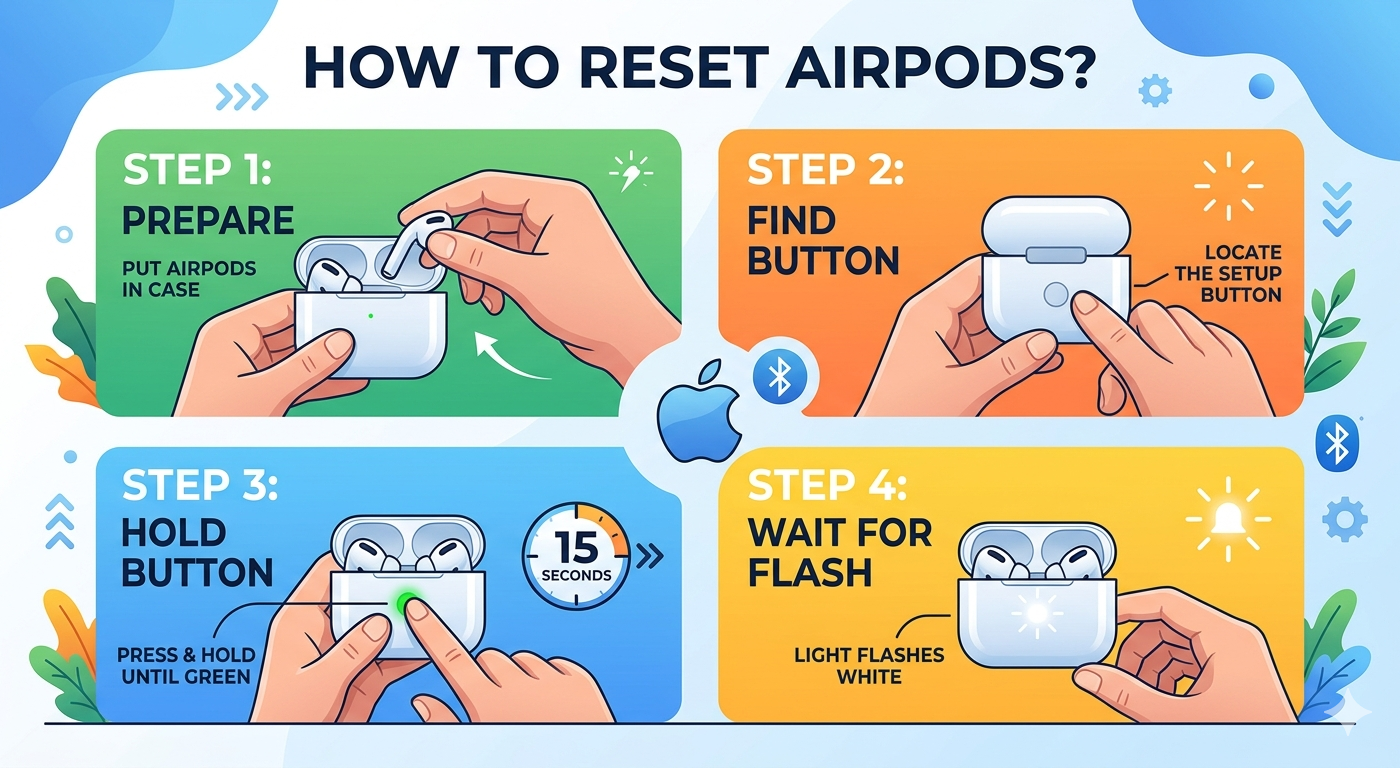
To factory reset AirPods 4 or AirPods Pro 3, put both buds in the case, close the lid for 30 seconds, open the lid, then double-tap the front of the case three times and wait for the status light to flash amber then white. On AirPods 1, 2, 3, AirPods Pro 1 and AirPods Pro 2, you hold the setup button on the back of the case for about 15 seconds instead. On AirPods Max, hold the Digital Crown and the listening mode button together for about 15 seconds until the light next to the charging port goes from flashing amber to flashing white.
That is the whole procedure. The harder part is knowing which AirPods you own, whether a reset is even the right fix, and what to do when the reset works but the earbuds still refuse to pair. This guide covers all of it, using Apple’s current instructions as of August 2026.
Try the 20-second fix first
Most AirPods problems are connection hiccups, not corruption. A reset wipes your custom controls, ear tip test results, hearing settings and device name, so spend 20 seconds on the gentler options first.
- Restart the AirPods. Apple’s official restart is simply: put both buds in the case and close the lid for at least 10 seconds. For AirPods Max, hold the Digital Crown and the listening mode button together for about 10 seconds until the status light flashes amber, then release immediately. That amber-only flash is a restart, not a reset.
- Toggle Bluetooth off and on on the phone, tablet or Mac. It fixes a surprising share of “connected but no audio” cases.
- Charge the case above 20 percent. A nearly dead case causes dropouts, one-sided audio and failed pairing that look exactly like a firmware fault.
- Restart the source device. If your iPhone’s Bluetooth stack is stuck, resetting the AirPods will not help.
- Check the audio output picker. Sound routed to a HomePod, car stereo or another Mac is the most common false alarm.
If two or more of those fail, move on to the reset.
Which AirPods do you have?
Reset steps split along one line: cases made before 2024 have a physical setup button; AirPods 4 and AirPods Pro 3 cases do not. If you are pressing the back of an AirPods Pro 3 case looking for a button, you will be there a while.
The model number starts with the letter A and is printed on the underside of each earbud, or under the left ear cushion on AirPods Max. You can also wear the AirPods, open Settings on iPhone and tap the AirPods name at the top; model name, serial number and firmware version are all listed there.
| Model | Year | Model numbers | How you reset it |
|---|---|---|---|
| AirPods 4 / AirPods 4 with ANC | 2024 | A3053, A3050, A3054 / A3056, A3055, A3057 | Triple double-tap on case front |
| AirPods Pro 3 | 2025 | A3063, A3064, A3065 | Triple double-tap on case front |
| AirPods Pro 2 (USB-C) | 2023 | A3047, A3048, A3049 | Setup button, 15 seconds |
| AirPods Pro 2 (Lightning) | 2022 | A2931, A2699, A2698 | Setup button, 15 seconds |
| AirPods 3 | 2021 | A2565, A2564 | Setup button, 15 seconds |
| AirPods Pro 1 | 2019 | A2084, A2083 | Setup button, 15 seconds |
| AirPods 2 | 2019 | A2032, A2031 | Setup button, 15 seconds |
| AirPods 1 | 2016 | A1523, A1722 | Setup button, 15 seconds |
| AirPods Max 2 | 2026 | A3454 | Crown + listening mode button |
| AirPods Max 1 (USB-C) | 2024 | A3184 | Crown + listening mode button |
| AirPods Max 1 (Lightning) | 2020 | A2096 | Crown + listening mode button |
Apple’s line-up as of August 2026: AirPods 4 at $129, AirPods 4 with Active Noise Cancellation at $179, AirPods Pro 3 at $249 and AirPods Max 2 at $549 (prices from apple.com, August 2026). Everything else above is discontinued but still supported. See Apple’s Identify your AirPods page for full details.
What a factory reset does and does not erase
A reset is less dramatic than the name suggests. It clears the pairing record and your personalization, and that is all.
| A reset erases | A reset keeps |
|---|---|
| Pairing with every device, including iCloud-synced devices | Installed firmware version (it never rolls back) |
| Custom name (goes back to “AirPods”) | Battery health and actual battery capacity |
| Press-and-hold, force sensor and Digital Crown assignments | Serial number and warranty status |
| Ear Tip Fit Test results and Personalized Spatial Audio profile | Physical damage, water damage or a failing driver |
| Hearing Aid and Hearing Test data on AirPods Pro 2 and Pro 3 | Your Apple Account association until you also remove them in Find My |
That last row matters. Resetting does not release the AirPods from your Apple Account. If you are selling them, the reset alone is not enough.
Factory reset AirPods 4 and AirPods Pro 3
These are the current-generation cases, and neither has a setup button. Apple’s method is a tap gesture on the case front.
- Put both AirPods in the case and close the lid.
- Wait 30 seconds.
- Open the lid, leaving the AirPods inside.
- On your iPhone, go to Settings, tap the AirPods name, tap Forget This Device and confirm. Skip only if they were never paired to your phone.
- With the lid still open, double-tap the front of the case three times: three separate double-taps in quick succession, on the front face, not the lid.
- Watch the status light. It flashes amber, then white. That amber-to-white transition is the confirmation the reset took.
If nothing happens, tap firmer and slightly higher, near the vertical middle of the case front. The case reads taps through the shell, so remove any thick case cover first.
Factory reset AirPods 1, 2, 3, AirPods Pro 1 and AirPods Pro 2
Every case from these generations has a small round setup button in the center of the back.
- Put both AirPods in the case and close the lid for 30 seconds.
- Open the lid.
- Forget the device in Settings if it is still listed on your iPhone.
- Press and hold the setup button for about 15 seconds, with the lid open and both buds inside.
- Release when the status light flashes amber, then flashes white.
The most common mistake is releasing too early. At around five seconds the light flashes white, which is pairing mode, not a reset. Keep holding through the amber flash. On AirPods 1 and 2 the status light sits inside the case between the buds; on AirPods 3 and both AirPods Pro generations it is on the front. Apple documents this on the Restart, unpair, or reset your AirPods page.
Factory reset AirPods Max (all generations)
AirPods Max have no case button, because the Smart Case is not a charging case. The original AirPods Max and the AirPods Max 2 released in 2026 use the same two controls on the right ear cup: the Digital Crown and the listening mode button beside it.
- Charge them to at least 50 percent first. If they will not charge at all, reset anyway.
- Take them off and hold them in your hands.
- Press and hold the Digital Crown and the listening mode button together for about 15 seconds.
- Watch the small status light next to the charging port. It flashes amber first, then changes to flashing white. Release at the white flash.
- Hold them near an unlocked iPhone to re-pair, or press and hold the listening mode button alone for about 5 seconds to enter Bluetooth pairing mode for a non-Apple device.
The critical detail: amber only means restart, amber then white means reset. The amber flash arrives at roughly 10 seconds; let go there and you have only rebooted them. Apple’s instructions are on How to reset your AirPods Max.
Light sequence decoder
| What the light does | What it means |
|---|---|
| Solid green, buds in case | Fully charged |
| Solid amber, buds in case | Charging, or less than one full charge left in the case |
| Flashing white | Ready to pair |
| Flashing amber, then white | Factory reset completed |
| Flashing amber only, then stops | Restart completed, or a pairing error occurred |
| No light at all | Case battery is flat; charge for 15 minutes and retry |
Re-pairing and rebuilding your setup
Open the case lid next to an unlocked iPhone and the setup card slides up within a couple of seconds. Tap Connect. If you use iCloud, the AirPods become available on every device signed in to the same Apple Account, so there is nothing to do on your iPad or Mac.
Then rebuild the four things the reset wiped:
- Rename them in Settings, so the Bluetooth list is readable again.
- Re-run the Ear Tip Fit Test on AirPods Pro. Seal quality drives bass response and noise cancellation, and it is the first thing to check if ANC feels weak.
- Rebuild Personalized Spatial Audio with the ear-scan flow. It takes a minute and makes a real difference for movies and TV.
- Reassign your controls: press-and-hold behavior, volume swipe, noise control cycle and Siri options.
AirPods paired to someone else’s Apple Account
This is the scenario a reset cannot solve on its own. AirPods still registered to a previous owner’s Apple Account will keep reconnecting to that account’s devices, show ownership warnings, or refuse to complete setup. Resetting the hardware does not break that link. The previous owner has to release them:
- Sign in at iCloud.com/find.
- Select the AirPods in the device list.
- Choose Remove This Device.
Apple’s rule: an online device cannot be removed instantly, only marked ready for repair or trade-in for 30 days. An offline device loses its activation lock straight away and disappears from Find My after 30 days. The fastest path is for the previous owner to put the AirPods in the case away from their own iPhone so they register as offline, then remove them. Full steps are on Apple’s Remove a device from iCloud page.
If you bought them secondhand and the seller has vanished, you are largely out of options. Apple will not unlock AirPods without proof of purchase in the original owner’s name, and no third-party service can do it legitimately. Before buying used AirPods, ask the seller to open Find My in front of you and remove the device.
Unpairing from Android, Windows, PlayStation and Xbox
On non-Apple devices, AirPods are ordinary Bluetooth headphones, so remove them from that device’s Bluetooth list rather than resetting them.
- Android: Settings, Connected devices or Connections, Bluetooth, tap the gear next to AirPods, then Unpair.
- Windows 11: Settings, Bluetooth & devices, three-dot menu next to AirPods, then Remove device.
- PlayStation 5: Settings, Accessories, General, Bluetooth Accessories, then remove.
- Xbox: Xbox consoles do not support Bluetooth audio, so AirPods cannot pair directly; you need the Xbox app on a phone for party chat. If the console itself is misbehaving, check whether Xbox servers are down before troubleshooting hardware.
To put a reset pair back into Bluetooth pairing mode: hold the setup button for about 5 seconds on older cases, double-tap the front of the case on AirPods 4 and AirPods Pro 3, or hold the listening mode button for about 5 seconds on AirPods Max. Wait for the flashing white light.
Firmware: what a reset does not change
A reset never rolls firmware back, and it will not push a stuck update through. AirPods firmware installs silently, on Apple’s schedule, when three conditions line up: the AirPods are in the case with the lid closed, the case is connected to power, and an iPhone, iPad or Mac connected to Wi-Fi is within Bluetooth range. Leave it at least 30 minutes.
To check your version, wear the AirPods, open Settings, tap the AirPods name and scroll to About. As of Apple’s May 2026 release notes, current builds are 8B39 for AirPods 4, 8B40 for AirPods Pro 3 and 8E258 for AirPods Max 2, published in the AirPods firmware release notes. There is no manual “update now” button, so if yours is behind, the fix is time on the charger near your phone, not a reset.
Symptom-to-fix quick reference
| Symptom | Most likely cause | Try this first | Will a reset help? |
|---|---|---|---|
| One bud silent | Blocked speaker mesh or earwax | Clean the mesh, check L/R balance in Accessibility | Sometimes |
| One bud won’t charge | Debris in the case well or on the contacts | Dry brush the case wells and bud contacts | Rarely |
| Won’t connect at all | Stale pairing record | Forget the device, then reset | Yes |
| Connects but no audio | Wrong output device selected | Check the AirPlay output picker | Rarely |
| Battery drains fast | Aged cells or ANC always on | Check age; try Off or Transparency for a day | No |
| Mic not working on calls | Mic setting locked to one bud, or blocked mic port | Set Microphone to Automatic; clean the stem port | Sometimes |
| ANC feels weak | Poor seal or clogged vents | Re-run Ear Tip Fit Test; swap tip size | Sometimes |
| Crackling or static | Interference or wet vents | Move away from other 2.4GHz gear; dry fully | Sometimes |
| Audio cuts out in one room | Wi-Fi and Bluetooth congestion | Move; test in another location | No |
| Constant reconnecting between devices | Automatic switching | Set “Connect to This iPhone” to “When Last Connected” | No |
Clean them before you conclude they are broken
The most common cause of “one AirPod is quieter” is not a fault, it is earwax across the speaker mesh. Apple says so plainly in its safety guidance: “Clean AirPods regularly. Device performance and noise control features like Active Noise Cancellation, Adaptive Audio, and Transparency can be affected by debris or earwax buildup.”
- Use a dry, soft-bristled brush on the speaker mesh, the kind bundled with electric razors and beard trimmers. Brush across the mesh, never into it.
- Wipe the body with a soft, dry, lint-free cloth. Slightly damp is fine on the outside; dry completely before charging.
- Pull the silicone ear tips off AirPods Pro and rinse them in plain water only, no soap or alcohol. Dry them fully, then line each tip up with the oval connector and push until it clicks.
- Brush out the charging wells in the case and the contacts on each stem. Pocket lint here is the usual reason one bud stops charging.
- Never use compressed air, sharp metal tools, bleach or hydrogen peroxide, and never run water into any opening.
On AirPods Max, wipe the cushions with a lightly damp lint-free cloth and air dry for an hour. If you wear glasses, thick arms break the seal against the cushions and cost you real noise cancellation, worth factoring in when you choose your frames.
When a reset will not help
Treat these as hardware or battery issues rather than software:
- Battery life has roughly halved. The lithium-ion cells in earbuds are tiny and degrade faster than any other component. Three to four years of daily use is typical before runtime becomes a problem, and no software step reverses it.
- Water exposure. Recent AirPods carry dust and water resistance ratings, but none are rated for submersion, and liquid damage is not covered by warranty.
- Rattle or distorted bass at low volume. That usually means a damaged driver.
- The case will not hold a charge on a known-good cable. The case has its own battery and can fail while the buds are fine; Apple services them separately.
Your options: AppleCare+ for Headphones covers unlimited accidental damage repairs with a $29 service fee per incident, plus free battery replacement if capacity drops below 80 percent. Without it, out-of-warranty battery and replacement service is priced per model and Apple quotes it only after inspecting the product, so get a written estimate first. Start at Apple’s AirPods repair page to book a Genius Bar appointment or a mail-in box. AirPods are sold in pairs but serviced individually, so one failing bud does not mean buying a whole new set. On older models, though, replacing both buds can approach the price of a current pair.
Frequently asked questions
Do AirPods 4 and AirPods Pro 3 have a setup button?
No. Apple removed the physical setup button from the cases introduced with AirPods 4 in 2024, and AirPods Pro 3 followed in 2025. To reset or enter pairing mode on those cases, you double-tap the front of the case instead. Cases for AirPods Pro 2 and earlier still have the round button on the back.
How long do you hold the AirPods case button?
About 15 seconds for a full factory reset, and you must hold through the amber flash until the light flashes white. Roughly 5 seconds gives you pairing mode only, which is a different function. Releasing at the amber flash restarts the AirPods without clearing their pairing history.
Does resetting AirPods remove them from Find My?
No. A factory reset clears the pairing but leaves the AirPods associated with the Apple Account they were registered to. To fully release them, sign in at iCloud.com/find, select the AirPods, and choose Remove This Device. Do this before selling or trading them in.
Can I reset AirPods without an iPhone?
Yes. The reset is done entirely on the hardware, using the case button, case tap gesture, or the Digital Crown and listening mode button on AirPods Max. You do not need any paired device. You will not be able to remove the Forget This Device entry from an iPhone you no longer have, though.
Why is one AirPod quieter than the other after a reset?
Almost always earwax on the speaker mesh, not a fault. Brush the mesh with a dry soft-bristled brush, then check Settings, Accessibility, Audio & Visual and confirm the left-right balance slider sits in the center. Cleaning fixes this far more often than any reset does.
Will a factory reset fix bad battery life?
No. A reset does not touch battery chemistry or capacity. If your AirPods run for noticeably less than half their original rated listening time, the cells have aged and only a battery service or replacement will help. AppleCare+ covers that at no extra charge below 80 percent capacity.
How do I reset AirPods bought secondhand?
Reset the hardware normally, then confirm the previous owner has removed them from their Apple Account at iCloud.com/find. If they have not, the AirPods will keep showing ownership prompts and may refuse setup. Only the original owner can release them, so settle this before money changes hands.
How often should I factory reset my AirPods?
Only when troubleshooting. There is no maintenance benefit to periodic resets, and each one costs you your ear tip fit results, spatial audio profile, custom controls and name. Restarting them by closing the lid for 10 seconds handles the vast majority of day-to-day glitches without losing anything.