
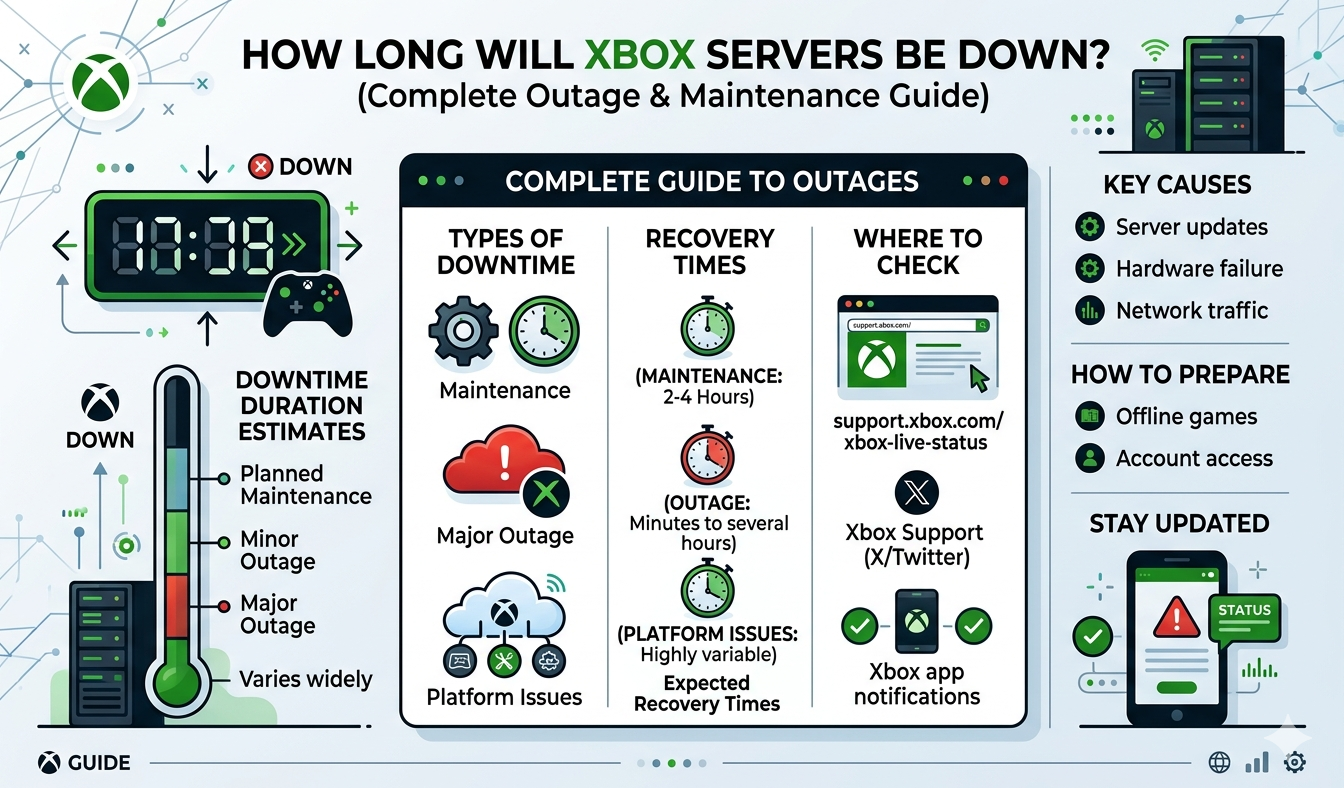
Most Xbox outages are over in under two hours. Short sign-in blips clear in 15 to 45 minutes, a genuine platform incident usually runs five to eight hours, and only a handful of times per decade does the whole thing stay broken for most of a day. The worst recent example is the July 26–27, 2026 outage, which ran roughly 20 hours from the first reports to Microsoft declaring full recovery.
The single fastest way to get a real answer right now is the official Xbox Status page. If it shows green and you are still stuck, the problem is almost certainly your game’s publisher or your own network, and this guide walks you through telling those apart in about a minute.
Check these five places first
Microsoft almost never publishes an ETA. What you can get is confirmation that the problem is theirs, which service is broken, and whether it is improving. Check in this order.
| Where to look | What it tells you | Speed |
|---|---|---|
| Xbox Status page | Official per-service state: Account & profile, Store & subscriptions, Games & gaming, Apps & mobile, Cloud gaming | Authoritative but slow to update |
| @XboxSupport on X | Plain-English acknowledgment and “still working on it” updates | Usually the first official word |
| Downdetector | Report volume and shape of the curve, plus what people are reporting (sign-in, game launch, server connection) | Instant, no waiting on Microsoft |
| Your console: Profile & system > Settings > General > Network settings | Whether your console can reach Xbox services at all, plus NAT type and connection test | Instant, and it separates you from them |
| Azure status | Whether the failure is upstream infrastructure hitting Xbox, Teams and Microsoft 365 together | Best signal for the really big ones |
One caveat: the official page lags. StatusGator, which has monitored Xbox status since April 2017 across 93 components, grades the accuracy of Xbox’s own status page a D, with an average two-to-four-hour delay before an incident is acknowledged and some disruptions never acknowledged at all. That is why Downdetector is on the list. A vertical spike in reports is real information even when the green checkmarks say otherwise.
How long Xbox outages usually last
There is no consumer service-level agreement, so there is no contractual repair window. What there is, is a track record. StatusGator has logged more than 145 Xbox outages since 2017, and they sort into three clean buckets.
- Blips (15 to 45 minutes). Sign-in stumbles, a bad node, a partial region. These are the most common by a wide margin. The February 17, 2026 incident is typical: reports peaked above 2,200 on Downdetector around 10:30 a.m. ET and were back to baseline within about half an hour.
- Real incidents (2 to 8 hours). One subsystem is genuinely broken and needs a rollback or a failover. The July 2, 2024 outage went down around 1 p.m. ET and came back just before 9 p.m. ET, roughly seven hours, and Microsoft never publicly explained the cause.
- Platform-level failures (12 to 24 hours). A dependency everything relies on fails. These happen roughly once every couple of years and are the ones that make the news.
If Microsoft has already acknowledged the problem on X, the honest expectation is “a few hours.” If it has been running six hours with no fix, budget for the rest of the day.
Outage type, typical duration and what still works
Not every Xbox outage breaks everything. Knowing which piece is down tells you whether to wait or to go do something else.
| What’s broken | Typical duration | What still works |
|---|---|---|
| Sign-in / authentication | 30 min – 6 hrs | Almost nothing online. Already-signed-in sessions often survive, so do not sign out or restart if you are mid-game |
| Store & purchases | 1 – 8 hrs | Owned and installed games, multiplayer, downloads already queued. New buys, gift cards and redeeming codes fail |
| Cloud saves | 1 – 12 hrs | Everything, but saves stay local. Do not play the same game on a second console until sync returns or you will get a conflict |
| Xbox Cloud Gaming | 1 – 6 hrs | Locally installed games on console and PC. Streaming to phone, browser and TV apps is dead |
| Party chat & multiplayer | 30 min – 4 hrs | Single-player, campaigns, split-screen. Third-party voice like Discord usually keeps working |
| Game Pass license checks | 2 – 20 hrs | Very little. This is the nasty one: if the console cannot verify entitlement, even installed and disc games refuse to launch |
| Achievements & presence | 15 min – 24 hrs | Everything else. Achievements queue locally and unlock retroactively once the service recovers |
| Downloads & updates | 1 – 6 hrs | Anything already installed. Mandatory day-one patches will block new games |
| A single publisher’s game servers | 20 min – 48 hrs | All other games, the Store, chat and streaming. Xbox itself is fine |
Recent major Xbox outages, with real dates and durations
Use these as your reference class rather than guessing.
| Date | Duration | Cause | Notable damage |
|---|---|---|---|
| Dec 25–26, 2014 | ~24 hrs | DDoS claimed by Lizard Squad | Christmas Day. Xbox Live returned Dec 26; PlayStation Network stayed down longer |
| Jul 2, 2024 | ~7 hrs | Never disclosed by Microsoft | Sign-in, Game Pass, friends lists, and even media apps like Netflix on console |
| Oct 29, 2025 | ~8 hrs | Azure Front Door configuration failure | Xbox dashboard, Store and library. Microsoft 365, Minecraft and Alaska Airlines went down alongside it |
| Feb 17, 2026 | ~30 min | Not stated | Sign-in and cloud save sync, resolved before most people noticed |
| Jul 26–27, 2026 | ~20 hrs | Third-party licensing service failure | Digital and disc games blocked across Xbox 360, Xbox One and Xbox Series X|S |
The July 2026 event is worth understanding in detail, because it set the modern worst case. Reports began around 11:10 p.m. ET on Sunday, July 26, and Xbox declared services fully restored at 7:24 p.m. ET on Monday, July 27, about 20 hours and 14 minutes end to end, per Game Informer’s timeline. Other coverage says 15 or 16 hours; those outlets measured from Microsoft’s first acknowledgment to the point most services recovered, around 2:30 p.m. PDT. Both are defensible, which is a reminder that “how long was it down” depends on whose clock you use.
Downdetector peaked at 3,339 US reports, with 66% citing game launch failures, 13% in-game problems and 12% server connection errors. The signature error was code 0x87e107df, a licensing validation failure. Xbox chief technology officer Scott Van Vliet wrote that “many players began experiencing issues with sign in, enumerating their game libraries and playing games,” called it “an unacceptable situation,” and promised a post-incident review covering dependency hardening and single points of failure. Tom’s Hardware reported that the failing service sat outside Xbox’s own infrastructure, which is why one dependency took down three console generations at once.
Scheduled maintenance versus an actual outage
These look identical from your couch and are completely different in how long they last. Maintenance has a published end time; an outage does not.
It’s probably scheduled maintenance if: the status page shows a maintenance state rather than a red or limited state; the window is overnight Pacific time; only one service is listed; Downdetector shows no spike; or the affected thing is a single game that just announced a patch. Publishers do this constantly, and Call of Duty in particular runs playlist updates and season rollouts on a predictable weekly cadence, so a mid-season server pause during a Call of Duty season update is usually a planned window rather than a platform failure.
It’s an unplanned outage if: Downdetector spikes vertically; multiple unrelated services break at once; @XboxSupport posts an acknowledgment without a fix time; or you see errors on both console and the Xbox mobile app. Planned maintenance almost never breaks sign-in globally.
Console system updates are a third category people confuse with outages. Xbox rolls those out in waves, and a stalled update is a download problem, not a server-down problem.
What actually causes Xbox outages
- Authentication and entitlement services. The most damaging category, because sign-in and license checks gate everything else. July 2026 was an entitlement failure, and it stopped even disc-based single-player games from launching.
- CDN and edge failures. Xbox runs on Azure. When Azure Front Door broke on October 29, 2025 because of a configuration change, Xbox went down as collateral damage alongside Microsoft 365 and Minecraft. If Teams is also broken at your job, that is your answer.
- DDoS attacks. Historically the marquee cause, most famously Christmas 2014. Mitigation has improved hugely since, and modern outages are far more often self-inflicted.
- Botched deployments. A bad config push or a release that fails in production. Usually the fastest to fix, because the answer is a rollback.
- Launch-day capacity spikes. A huge release can overwhelm licensing and download infrastructure. Xbox wobbled during Halo: Campaign Evolved’s early access window in July 2026, days before the big outage.
- Third-party game servers. Not an Xbox outage at all, but the most common thing people report as one.
Xbox, the publisher, or you? A 60-second triage
- Can you sign in? If sign-in fails or your gamertag shows offline, it is Xbox or your connection, not the game.
- Does a second game work online? Launch anything else with a multiplayer component. If that connects fine, Xbox is up and the first game’s publisher is the problem.
- Does a second device work? Load the Xbox mobile app on cellular data with Wi-Fi off. If your friends list and Store load there but not on the console, the fault is your home network.
- Check the publisher’s own status page. Activision, EA, Rockstar, Ubisoft and Epic Games all publish one, and they are generally faster and more specific than Xbox’s.
- Check Downdetector for both. Two separate curves tell you which company owns the problem.
Solo content makes a good diagnostic. Running something like the Mauer der Toten Easter egg alone needs no matchmaking, so if that launches and matchmaking does not, the fault is server-side.
Home network checklist when it turns out to be your side
Work down this list. The first three fix most “Xbox is down” reports that are not actually Xbox.
- Hard power cycle the console. Hold the power button for 10 seconds until it fully shuts off, unplug the power cable for 30 seconds, plug back in and boot. This clears the cache, which a normal restart does not.
- Power cycle the modem and router. Unplug both, wait 60 seconds, bring the modem up first and let it sync before restarting the router.
- Run the built-in test. Settings > General > Network settings > Test network connection, then Test multiplayer connection. The second reports NAT type, packet loss and latency.
- Fix NAT type. Strict or Moderate NAT breaks party chat and matchmaking while everything else looks fine. Enabling UPnP on the router solves most cases.
- Port forward if UPnP fails. Xbox needs UDP 88, 500, 3544 and 4500 open, plus port 3074 on both TCP and UDP, pointed at your console’s reserved local IP.
- Check for double NAT. Two routers in series, typically an ISP gateway plus your own mesh, will force Strict NAT no matter what you forward. Put the ISP box in bridge or passthrough mode.
- Raise your MTU. If the network test reports MTU as too low, set the router’s MTU to 1500, or 1492 on a PPPoE DSL line. Values below roughly 1384 will break Xbox services outright.
- Switch DNS. Settings > General > Network settings > Advanced settings > DNS settings > Manual, then 1.1.1.1 and 1.0.0.1, or 8.8.8.8 and 8.8.4.4. ISP DNS failures look exactly like an Xbox outage.
- Clear the alternate MAC address. Advanced settings > Alternate MAC address > Clear, then restart. A stale entry left over from hotel or dorm Wi-Fi will silently block sign-in.
- Go wired, or at least 5 GHz. Ethernet removes an entire class of intermittent faults. If you must use Wi-Fi, use the 5 GHz band and move off channel 1/6/11 congestion.
One thing that is never an outage: chat audio cutting out while gameplay stays smooth. That is a headset problem. If you use wireless earbuds with the Xbox app on your phone for party chat, a pairing reset usually clears it, and the steps to reset AirPods take a minute.
What you can still do while Xbox is down
Two settings decide how much of your library survives an outage, and both are worth configuring before you need them.
Set your home Xbox. Settings > General > Personalization > My home Xbox. This gives the console a persistent local license for your digital games, so they keep launching when the licensing service cannot be reached, and anyone signed in there can play your library. You can change it up to five times a year, so pick the console you actually use.
Go offline deliberately. Settings > General > Network settings > Go offline, then restart. This stops the console retrying failed license checks in a loop, and single-player games with a valid local license usually start normally. Use Go online once the status page is green.
Also still available in most outages: disc games the console has already validated, local multiplayer and split-screen, anything already downloaded, and media apps, which run on their own infrastructure, so an evening with something new to stream is a fine fallback. Achievements earned offline unlock retroactively once the service recovers. Genuinely gone: cloud saves, Cloud Gaming, matchmaking, the Store, code redemption, and Game Pass titles if licensing is what broke.
Does Microsoft compensate you for downtime?
There is no published policy and no consumer SLA. The Microsoft Services Agreement does not promise uninterrupted service, and Microsoft has never committed to automatic credits for Xbox network downtime. Nothing was offered after the July 2026 outage beyond the promised post-incident review. Goodwill gestures do have precedent: Microsoft gave affected Gold members a free month of service after a 2012 outage, and again after a later cloud saved games outage. Both were discretionary and announced after the fact.
If you want to ask:
- Wait until the outage is officially resolved. Support cannot process anything mid-incident.
- Go through the virtual agent at support.xbox.com and ask for a human, then request a subscription credit for the outage.
- Give the date, approximate duration and the error code you saw. Specifics get further than “it was down all day.”
- If you bought a game you could not launch, request a refund through your Microsoft account order history instead. That path has a documented policy behind it.
Expect a partial month’s credit at best, and expect it to be a courtesy rather than an entitlement. Game Pass Ultimate is $22.99 a month in the US after Microsoft’s April 2026 price reduction from $29.99, so a full day of downtime is worth about 77 cents in strict pro-rata terms.
How to get notified when Xbox comes back
- Follow @XboxSupport on X with post notifications on. It is consistently the first place Microsoft says “resolved.”
- Set a Downdetector alert. A free account subscribes you to a specific service, and the report curve dropping is usually the earliest real signal.
- Use a status aggregator. StatusGator and IsDown watch the official Xbox page and notify you when a component flips back to operational.
- Retry every 20 to 30 minutes. Hammering the sign-in button during a recovery adds to the load slowing that recovery.
- Do not factory reset. Never reset the console, delete your profile or reinstall games during a suspected outage. You lose local data and fix nothing server-side.
Frequently asked questions
How long do Xbox servers usually stay down?
Most Xbox outages are resolved within an hour, and the majority of those inside 45 minutes. A confirmed platform incident typically runs five to eight hours. Outages longer than 12 hours are rare, happening roughly once every two years. The July 2026 licensing failure, at about 20 hours, is the longest in recent memory.
Why can’t I play my downloaded or disc games when Xbox is down?
Your console periodically verifies that your account is entitled to each game. When the licensing service fails, that check cannot complete and the game refuses to launch, even from disc. Setting your console as your home Xbox stores a persistent local license and prevents most of this. Switching to offline mode also helps.
Is it Xbox that’s down or just my game?
Try signing in and launching a different online game. If sign-in works and a second game connects, Xbox is fine and the first game’s publisher has a server problem. Check that publisher’s own status page, since Activision, EA, Rockstar, Ubisoft and Epic all publish one and update faster than Xbox does.
Does Microsoft give refunds or Game Pass credit for outages?
There is no automatic compensation and no consumer service-level agreement. Microsoft has occasionally given goodwill credits, such as a free month of Xbox Live Gold after past incidents, but never as policy. You can contact Xbox Support after an outage ends and request a subscription credit, and separately request refunds for unplayable purchases.
Can I play Xbox offline during an outage?
Yes, for most single-player content. Go to Settings, General, Network settings and choose Go offline, then restart. Games with a valid local license will launch, achievements queue locally and unlock later, and saves stay on the console until cloud sync returns. Multiplayer, the Store and Cloud Gaming will not work.
Does Xbox Cloud Gaming work when the console network is down?
Usually not. Cloud Gaming depends on the same sign-in and entitlement services as the console, so a platform-wide outage takes it down too. It can fail independently, though, and often recovers before the rest of the network. All three console Game Pass tiers include cloud gaming, with Ultimate getting the best quality and shortest queues.
How can I tell scheduled maintenance from a real outage?
Maintenance shows a maintenance state on the status page rather than red or limited, is usually overnight Pacific time, affects one named service, and produces no Downdetector spike. An unplanned outage spikes reports vertically, hits several unrelated services at once, and gets an acknowledgment from @XboxSupport with no repair estimate.
Should I reset my Xbox if the servers are down?
No. A factory reset or profile deletion cannot fix a server-side failure and risks losing local saves that have not yet synced to the cloud. A hard power cycle, holding the power button 10 seconds and unplugging for 30, is safe and worth doing once. Beyond that, wait it out.